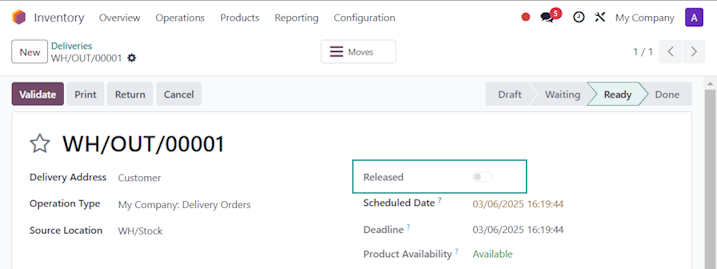


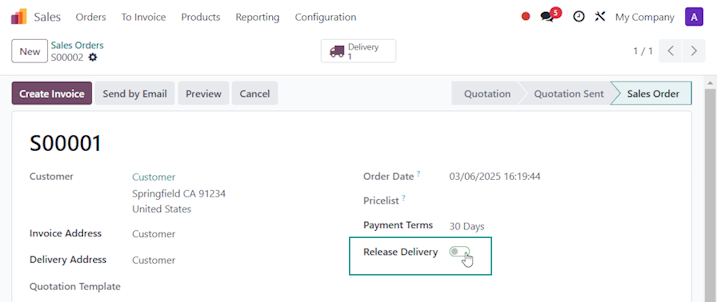
Since each Delivery Order is related to the Sales Order that created it, you can create a custom Release field on the Sales Order and a matching related one on the Delivery Order, then show these fields to your Users.
First, via the Fields Menu in Developer Mode, create a field on the Sales Order to manage releasing the Delivery Order:

Add this field to the UI by creating your own Custom View that inherits and overrides the base Odoo View:

<data>

<field name="payment_term_id" position="after">
    <field name="x_release" widget="boolean_toggle"/>
</field>

</data>
Now, create the field on the Delivery Order (Transfer)

Note that this is a Related Field to sale_id.x_release, so it will grab the value from there, and is Readonly (so it can’t be changed on the Delivery Order).
Then we add the x_release field to the Delivery Order Form and List View:

<data>

<label for="scheduled_date" position="before">
    <field name="x_release" widget="boolean_toggle" invisible="picking_type_code !='outgoing'"/>
</label>

</data>
Note that we make this field invisible if the transfer is not a delivery order (is a receipt or internal transfer).
Finally we add the field to the List View so Users can see which Delivery Orders have been released:

<data>

<field name="name" position="before">
    <field name="x_release" widget="boolean_toggle"/>
</field>

</data>
User Experience:
Delivery Order List:

Delivery Order Form: